
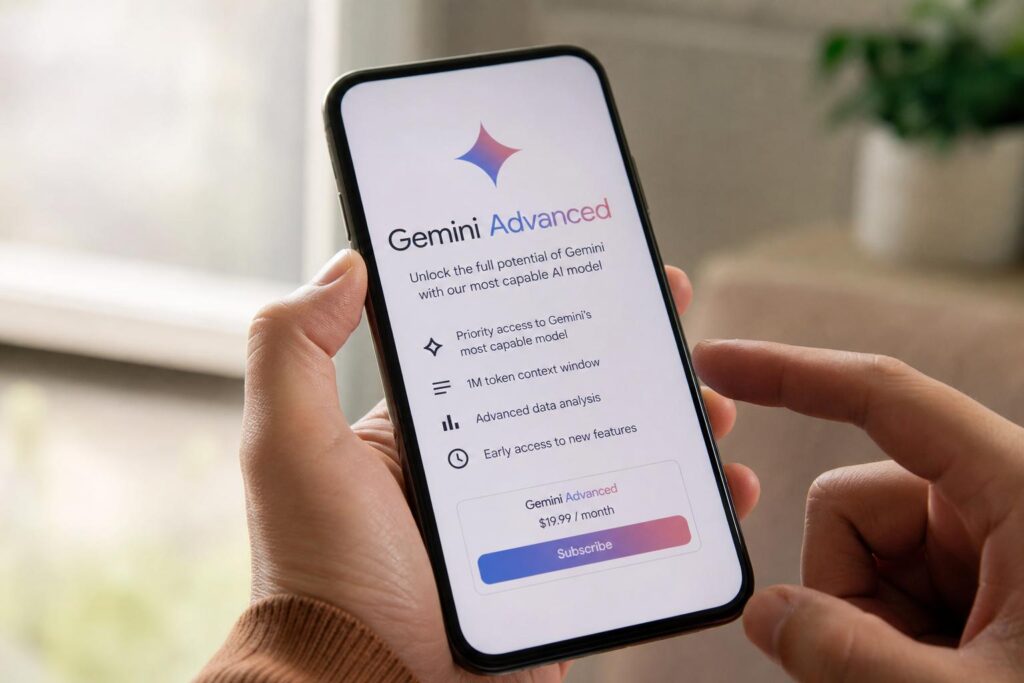
Paid AI plans are piling up fast, and that makes one question unavoidable: is Gemini Advanced worth paying for, or is it just another badge on top of tools you already use for free? That question matters even more for people who live inside Google’s ecosystem—Gmail, Docs, Drive, Meet, Android, and Chrome—because the value of a subscription is rarely about one chatbot alone. It is about how deeply the service fits into the work you already do.
That is why the topic of Подписка Gemini Advanced: возможности и цена (подписка Gemini Advanced) keeps coming up in searches and tech discussions. People do not just want a feature list. They want a clear sense of what the plan unlocks, how the pricing works, what it feels like in day-to-day use, and whether the extra cost makes sense for students, freelancers, office teams, or curious power users.
Gemini Advanced sits inside Google’s broader AI subscription offering, which has been tied to Google One AI plans in many markets. The exact bundle and availability can change over time, so the smart way to evaluate it is not by hype, but by function: what tools are included, where they work, and how often they save you time. That is what this article focuses on.
What Gemini Advanced is, in plain English
Gemini Advanced is Google’s premium tier for access to its more capable AI features and models. In practical terms, it usually means better model access than the free version of Gemini, plus deeper integration with Google services and, depending on the current plan structure, extras bundled through Google One AI offerings.
The free version of Gemini is enough for casual prompts, quick brainstorming, and simple writing help. Gemini Advanced is aimed at people who push harder: long documents, heavier reasoning tasks, multi-step planning, coding help, more demanding research support, and workflows that jump between text, files, and Google apps.
That distinction matters. A lot of people assume “advanced” means “slightly nicer answers.” Sometimes it does. But the real value appears when the tool handles tasks that are messy rather than neat—summarizing a dense PDF, drafting several versions of an email with different tones, helping outline a presentation from scattered notes, or comparing ideas across multiple sources.
How the subscription is positioned inside Google’s ecosystem
Google has not treated Gemini Advanced as a standalone island. It is part of a larger strategy: bring AI into products people already use instead of asking them to start from scratch somewhere else. That sounds obvious, but it changes the experience. An AI assistant is more useful when it can interact with your documents, your calendar, your email drafts, and your cloud files without making you bounce across six tabs.
In many cases, access has been offered through Google One AI Premium or related plan naming under the broader umbrella of тарифы Google AI. Names and packaging may shift by region and by date, but the underlying logic is consistent. You are not paying only for chat responses. You are paying for stronger model access plus a layer of convenience around familiar Google products.
For some users, that integration is the whole selling point. If your work already flows through Google Workspace tools, then Gemini Advanced can feel less like “one more app” and more like an added capability across your existing setup. If you barely use Google services, the same subscription may feel much less compelling.
What’s included in Gemini Advanced
One of the most common questions is simple: что входит в Gemini Advanced? The short answer is premium AI access, but that is too vague to be useful. What people really want to know is what changes the moment they start paying.
At a high level, Gemini Advanced typically includes access to Google’s more capable Gemini model tier, support for more complex prompts, and features aimed at deeper productivity. Depending on the plan and current rollout, it may also include benefits tied to Google One storage or AI features inside apps such as Gmail, Docs, Slides, Sheets, or Meet.
Here is the practical version of that breakdown.
- Access to a more advanced Gemini model than the standard free tier
- Better support for complex reasoning, long-form writing, planning, and analysis
- AI assistance that may connect with Google apps and services
- Potential access to premium features added under Google One AI bundles
- In some packages, cloud storage and other Google One benefits
That list may look broad, and it is. Google’s AI offerings evolve quickly, so the exact bundle can differ by market and by time. Still, the core promise remains stable: more capable AI, more room for serious work, and tighter links to Google’s productivity environment.
Advanced model access
This is the centerpiece. Paid users generally get access to a more powerful Gemini model than free users. That means stronger performance on tasks that involve synthesis, nuanced instructions, structured outputs, and detailed back-and-forth prompting.
In real use, the difference often shows up in patience and coherence. The advanced tier is more likely to keep track of context, follow layered instructions, and produce results that require less cleanup. That does not mean it is flawless. It means the average output is more useful on the first try.
Longer and more demanding tasks
Free AI tools are often fine until you hand them something ugly: a long policy draft, a messy brainstorm, a spreadsheet-related question with too many conditions, or a request that blends summary, analysis, and rewriting. Gemini Advanced is designed for that heavier workload.
For example, if you upload a long report and ask for an executive summary, a risk list, and a client-friendly explanation in plain English, that is exactly the kind of layered prompt where premium access earns its keep. It is not magic, but it reduces the amount of manual untangling.
Integration with Google services
This is where Gemini Advanced can become genuinely practical. If Gemini can help draft emails, summarize documents, organize information, or support planning inside the tools you already use, you save more time than you would from a standalone chatbot.
That is especially true for people who spend their day inside Docs and Gmail. I have seen the difference in simple tasks that are annoying rather than difficult: turning rough notes into a clean memo, rewriting a message so it sounds sharper but not colder, or extracting next steps from a long thread. Those jobs are small on paper, but they pile up.
Pricing: what the subscription costs and how to think about it
For most readers, the most important issue is стоимость подписки. Gemini Advanced has commonly been included as part of Google One AI Premium, which in the U.S. has often been priced around $19.99 per month. That figure is the one many people recognize, though pricing, introductory offers, taxes, billing cycles, and regional rates can vary.
That means the real question is not just “How much is it?” but “What does that monthly charge replace or save?” If the service helps you avoid paying for separate cloud storage, a second AI tool, or hours of repetitive editing each month, the value equation changes quickly. If you use it twice a week for novelty prompts, it probably does not.
Here is a simple way to look at it.
| Type of user | Likely value from Gemini Advanced | How the price may feel |
|---|---|---|
| Casual user | Low to moderate | Probably expensive for occasional use |
| Student or researcher | Moderate to high | Reasonable if used weekly for summaries, outlines, and study help |
| Freelancer | High | Often worthwhile if it saves time on drafts, client communication, and planning |
| Google Workspace-heavy professional | High | Easier to justify because of ecosystem integration |
| Team with specialized workflows | Depends on setup | Needs closer comparison with business AI tools |
The headline number matters, but context matters more. Twenty dollars a month can be trivial for someone billing by the hour and excessive for someone who just wants help writing captions or asking the occasional question.
Is there a free trial or promotional offer?
Google has, at times, offered trial periods or temporary promotions for AI plans. Those offers can be useful because Gemini Advanced is hard to judge from screenshots alone. The real test is whether it becomes part of your routine after the novelty wears off.
If a trial is available in your region, use it for actual work, not toy prompts. Feed it the tasks you dread: summarizing meeting notes, restructuring a clumsy proposal, generating a project brief, or cleaning up a spreadsheet explanation. You will know very quickly whether the subscription earns its monthly fee.
Where Gemini Advanced tends to shine
Premium AI is easiest to evaluate when you stop thinking in features and start thinking in moments. What moments in your workday are slow, repetitive, or mentally expensive? Gemini Advanced is strongest when it shortens those moments without forcing you into a new system.
Here are the use cases where it tends to make the strongest impression.
Writing and rewriting
Drafting is the obvious one, but rewriting is often more valuable. A lot of professional writing is not about creating text from nothing. It is about reshaping existing text so it fits a purpose: shorter, clearer, warmer, firmer, more persuasive, less repetitive.
Gemini Advanced is useful when you need options. You can ask for a client email in three tones, a summary of a proposal in under 120 words, or a version of a long explanation rewritten for executives who will only skim it. That sort of compression saves energy, and energy is usually more limited than ideas.
Research assistance
It is important to be precise here. Gemini Advanced can help with research tasks, but it does not replace source checking. What it does well is organize, summarize, compare, and frame information. It can help you turn a pile of material into a clean map of key points, open questions, and follow-up angles.
That is especially useful at the start of a project, when the problem is not lack of information but lack of structure. If you have ever had ten tabs open and no idea how to turn them into a coherent brief, you know why this matters.
Planning and structured thinking
Some people use AI as a writing tool. Others use it as a thinking partner. Gemini Advanced is often stronger in the second role than people expect. It can break projects into stages, create timelines, list dependencies, surface risks, or propose ways to organize a presentation or report.
I have found this particularly helpful when a task is vague. When the assignment is “put together something smart for next week,” the hardest part is often not execution. It is defining the shape of the work. A capable AI model can give that fog a useful outline.
Summarizing files and long documents
This is one of the easiest wins. Long documents drain attention fast, especially when half of the content is relevant and half is noise. Gemini Advanced can summarize, extract action items, identify themes, or explain a dense section in plain language.
That said, summaries should never be treated as substitutes for reading when stakes are high. For legal terms, policy decisions, contracts, financial reports, or compliance material, AI summaries are a first pass, not a final authority.
How it compares with the free version of Gemini
The jump from free to paid is not always dramatic on easy prompts. Ask for a recipe, a birthday message, or five travel ideas, and both versions may look perfectly fine. That is why some users leave unimpressed. They are not testing the plan where it matters.
The difference tends to appear when tasks become layered, long, or fussy. Paid access is more relevant if you regularly ask for things like: “Read this document, identify weak logic, suggest a cleaner structure, and rewrite the introduction in a more confident but not aggressive tone.” That is a different class of work than casual chatting.
Another way to put it: the free version is often enough for curiosity. Gemini Advanced is for people who want to offload a slice of real cognitive labor.
Gemini Advanced inside Gmail, Docs, and other Google tools
For many users, this is the real battleground. Most AI tools look helpful in a demo. The ones that survive are the ones that shave friction off ordinary work. Google knows this, which is why integration across its apps matters more than glossy branding.
Gmail
Email is still one of the most repetitive forms of knowledge work. A smart assistant in Gmail can help draft replies, shorten messages, adjust tone, and summarize long threads. That is not glamorous, but it is useful almost immediately.
If you handle client communication, recruiting, scheduling, support, or internal updates, even a small reduction in email time adds up over a month. A few minutes saved each day becomes a noticeable chunk of reclaimed attention.
Google Docs
Docs is where AI assistance often feels most natural. Drafting, restructuring, summarizing, and editing all belong there. Instead of copying text into an external chatbot and then pasting it back, you can stay inside the document where the work actually lives.
That continuity matters more than it sounds. Context gets lost when you keep switching environments. An AI tool that works alongside the document rather than outside it tends to produce a smoother workflow and fewer messy handoffs.
Slides and presentations
Presentation work is part writing, part design, part storytelling. Gemini Advanced can help on the structure side: outline the deck, group arguments, suggest slide titles, condense text, and turn raw notes into a sequence that makes sense.
Anyone who has built a presentation from scratch knows the problem is rarely “I have no words.” The problem is deciding what belongs on slide three and what needs to disappear entirely. AI can be surprisingly good at that first pass.
Sheets and data-related help
People sometimes expect an AI assistant to act like a full analyst. That expectation needs tempering. Gemini Advanced can help explain formulas, suggest ways to structure data, summarize trends, or assist with spreadsheet logic. It can be useful around data without replacing careful analysis.
For non-specialists, that alone is valuable. Many office workers do not need a data scientist. They need help getting unstuck in Sheets without losing an hour to trial and error.
Who should seriously consider paying for it
Not every subscription needs to be for everyone. In fact, the easiest way to judge Gemini Advanced is to be blunt about fit.
Freelancers and consultants
If your work involves proposals, client emails, research summaries, content outlines, and recurring admin-heavy writing, Gemini Advanced can pay for itself in time saved. Freelancers often wear too many hats, and AI is most useful when it trims the small tasks that keep breaking concentration.
Writers, marketers, coaches, analysts, and solo operators are especially likely to see practical value. Not because the tool replaces expertise, but because it reduces drag between idea and deliverable.
Students and academic users
Students can benefit from summaries, study guides, concept explanations, question generation, and note organization. Used responsibly, it is a good support tool for learning. Used lazily, it becomes a shortcut that weakens understanding. The line between those two outcomes is very real.
The smartest use is not “write my paper.” It is “help me understand this reading,” “quiz me on these notes,” or “show me where my argument is thin.” That turns the AI into a tutor-like assistant rather than a substitute for thinking.
Professionals already deep in Google’s ecosystem
This group is the clearest target. If your files are in Drive, your drafts live in Docs, your calendar drives your week, and your inbox never stops moving, Gemini Advanced has more room to prove itself. Integration is not a side benefit in that scenario. It is the product.
For these users, comparing Gemini Advanced to a generic standalone chatbot misses the point. The better comparison is whether Google’s integrated AI is more convenient than stitching together separate tools.
Who probably does not need it
There is also value in saying no. If your AI use is light, occasional, and mostly recreational, the free version of Gemini or another free assistant may be enough. Paying monthly for a tool you only remember twice a month is a classic subscription trap.
It may also be unnecessary if your company already pays for another enterprise AI platform that covers your needs more directly. Overlapping subscriptions add cost without adding clarity. In that case, the smarter move is usually to standardize around one system.
And if privacy, compliance, or internal policy limits what you can upload or process through external AI systems, the useful features may shrink fast. The more sensitive the material, the more carefully you need to evaluate your workflow and permissions.
Limitations you should keep in mind
No AI subscription should be judged as if it were flawless, and Gemini Advanced is no exception. Better model access improves outcomes, but it does not eliminate errors, vague answers, weak citations, or misplaced confidence. The polished tone of AI can sometimes make mistakes look more trustworthy than they are.
That is why premium AI works best as an accelerator, not an unquestioned authority. It can speed up drafting, synthesis, and ideation. It should not be the final reviewer of anything where precision matters deeply.
Another limitation is product fluidity. Google updates features, names, access rules, and integrations regularly. That can be good news when new tools arrive, but it also means users need to keep an eye on what the plan currently includes rather than relying on outdated assumptions.
How to decide if the price is justified for you
If you are trying to judge the стоимость подписки in a practical way, skip abstract debates and do a time audit. Make a list of the recurring tasks that eat your week: inbox cleanup, rough drafting, summarizing meetings, extracting action items, presentation planning, or document restructuring.
Then ask a blunt question: if Gemini Advanced cut even 20 to 30 minutes from several of those tasks each week, would that matter? For an hourly professional, the answer is often yes. For someone who wants occasional curiosity-driven use, the answer is often no.
- List your three most repetitive text-heavy tasks.
- Test whether Gemini can shorten or simplify them.
- Estimate time saved across a month.
- Compare that value with the monthly fee.
- Factor in any bundled storage or Google One benefits you already use.
That framework sounds simple because it is. Subscription decisions go wrong when people pay for potential instead of actual use. Gemini Advanced is easiest to justify when it becomes part of a weekly workflow, not a clever thing to demo at lunch.
A realistic verdict on Gemini Advanced
The conversation around Подписка Gemini Advanced: возможности и цена (подписка Gemini Advanced) often swings between two extremes. One side treats premium AI as essential. The other dismisses it as overhyped. The truth is less dramatic and more useful.
Gemini Advanced is a strong option for people who already live in Google’s ecosystem and regularly handle writing, analysis, summaries, planning, and document-heavy work. In that context, the combination of a more capable model and tighter integration can make the subscription feel practical rather than flashy.
If you are looking at тарифы Google AI and wondering whether the upgrade is worth it, start with your habits, not the marketing. Ask what you need the tool to do on a Tuesday afternoon when your inbox is full, your draft is messy, and you are running late. That is where premium AI either proves itself or quietly fades into the background.
And if your main question is still что входит в Gemini Advanced, the best answer is this: not just stronger AI, but a different kind of convenience. Whether that convenience is worth the monthly cost depends almost entirely on how often you turn scattered information into finished work. For people who do that every day, the subscription can make sense. For everyone else, the free tier may be enough—and there is nothing wrong with that.
