
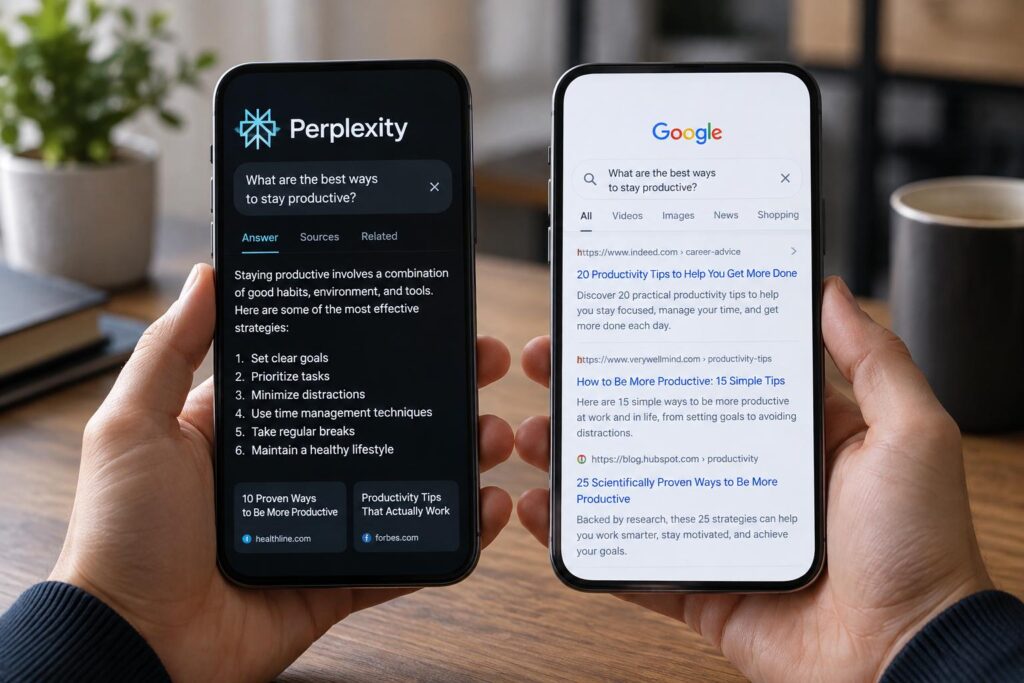
Search used to be simple. You typed a few words into Google, opened five tabs, ignored three of them, and stitched together an answer from the two that looked least suspicious. Then tools like Perplexity arrived and changed the rhythm of the whole experience. Instead of ten blue links, you get a direct response, source citations, and a feeling that the machine has already done the first round of reading for you.
That shift has sparked a very practical question: Perplexity или Google? Not in the abstract, and not as a tech fandom argument, but in the daily sense of what actually works when you need reliable information, fast. The answer is not as tidy as “old search bad, AI search good.” These tools are built for different habits, and they shine in different moments.
This comparison takes a close look at how both systems work, where each one saves time, where each one can mislead you, and whether AI-assisted search is a true замена поисковику or more of a companion. If you care about speed, source quality, research depth, and plain usability, the differences matter more than the hype.
Why this comparison matters now
For years, Google trained us to think of search as a scavenger hunt. You entered a query, skimmed snippets, compared sources, and decided what deserved your attention. It was imperfect, but the process gave you visibility into where information came from and how many viewpoints were out there.
Perplexity offers a different promise. It turns search into a conversation. Instead of asking you to assemble the puzzle alone, it produces a synthesized answer and points to the pieces it used. That sounds efficient because it often is. It also changes the user’s role from hunter to verifier.
That distinction matters because information behavior shapes judgment. If a tool makes life easier but also tempts you to trust too quickly, the convenience comes with a cost. This is where the real Perplexity vs Google discussion begins: not with branding, but with how each system nudges your thinking.
What Google does best
Google remains the default search engine for one simple reason: it is still exceptionally good at finding the web. That sounds almost too obvious to say, but it matters. Google’s core strength is breadth. It can surface news, official documents, maps, forums, product pages, academic references, videos, and local business information at a scale no newer tool can fully match.
When you need navigation rather than a single neat answer, Google is hard to beat. Search for a restaurant, a tax form, a software download, a court filing, or a breaking news topic, and Google gives you an ecosystem of options. Sometimes the answer is not one page but a field of sources, and Google is built for that field.
It also has an advantage in freshness for many query types. News results, live updates, local information, shopping, and event-related searches often feel more immediate and more operationally complete on Google. Perplexity can summarize what it finds, but Google often feels closer to the pulse of the live web.
Another quiet strength is user control. A skilled searcher can refine queries, switch tabs, use operators, compare domains, and intentionally move from broad to narrow. Google rewards that style of research. It may take more effort, but it also gives more transparency into the information landscape.
What Perplexity does best
Perplexity shines when the problem is not access to pages but synthesis. Ask a layered question—something like “What are the differences between Roth and traditional IRA contribution rules, and how do income limits affect eligibility?”—and Perplexity often gives you a structured answer immediately. Instead of spending fifteen minutes opening tabs, you start with a compact briefing.
That makes it especially useful for exploratory research. If you are entering a topic you do not know well, Perplexity reduces friction. It can explain terminology, connect related ideas, and suggest follow-up questions in a way that feels closer to having a research assistant than using a classic search box.
The citation model also gives it an important edge over many generic chatbots. Perplexity usually shows where claims came from, which is essential because AI without sourcing is a confidence machine with no paper trail. It is still your job to inspect those sources, but at least the trail is there.
I have found this especially helpful when trying to understand technical topics outside my own lane. With Google, I might bounce between a university page, a Reddit thread, and a vendor blog before I even know which vocabulary matters. With Perplexity, the first answer often gives me enough structure to ask better questions. That is a real gain, not just a novelty.
Search results vs synthesized answers
The deepest difference between the two tools is this: Google primarily points, while Perplexity primarily composes. Google says, in effect, “Here are the places to look.” Perplexity says, “Here is the likely answer based on what I found.” Those are not small variations of the same act. They are different products with different risks.
Pointing preserves ambiguity. If a topic is contested, messy, or evolving, Google often reflects that messiness by presenting multiple sources that disagree. Composing smooths rough edges. That can save time, but it can also flatten nuance, especially when the sources themselves are mixed in quality or interpretation.
This is why AI search feels brilliant one minute and vaguely slippery the next. A polished response can hide weak sourcing, partial context, or an outdated claim. Google’s clutter is often annoying, but clutter has one virtue: it reminds you that knowledge on the web is not always settled.
If your priority is quick orientation, поиск через нейросеть can feel dramatically better. If your priority is seeing the raw landscape before making up your mind, Google still has the upper hand. The choice depends on whether you need an answer now or a map of the territory.
Speed: which one actually saves time?
Perplexity usually wins the first minute. For straightforward informational queries, it removes several steps at once: search, click, skim, compare, summarize. That compression is the product. If your question is clear and the stakes are moderate, it is often the faster tool by a wide margin.
Google can become faster over a longer session, especially if you already know how to search well. An experienced user can spot official domains, ignore junk, and zero in on the right source quickly. In those hands, Google is less a pile of links than a precision instrument.
The trade-off shows up in verification time. Perplexity can save ten minutes upfront and cost five minutes later if you need to check whether the summary got the details right. Google can cost more effort at the beginning but give you more confidence in what you found. Time saved is not just about output speed; it is also about how much checking the tool leaves on your desk.
For casual use, Perplexity often feels faster. For professional research, the stopwatch gets more complicated.
Accuracy and hallucinations
This is where people tend to become either too cynical or too trusting. Google does not “hallucinate” in the AI sense because it is not generating a unified answer from scratch. But it can still surface bad information, spam, SEO sludge, and confidently written nonsense. Search has never been a guarantee of truth.
Perplexity adds another layer of risk. It may pull from legitimate sources and still misstate the relationship between them, overgeneralize a claim, or present a disputed point as settled. In other words, the problem is not only source quality but synthesis quality. A wrong answer wrapped in smooth prose can be more misleading than a messy page of mixed links.
That does not mean Perplexity is unreliable by definition. On many topics it performs very well, especially when the sources are stable and the question is well bounded. But the more specialized, legal, medical, financial, or rapidly changing the topic becomes, the more careful you need to be.
A useful rule is simple: trust Perplexity for orientation, trust primary sources for decisions. If the answer affects money, health, compliance, contracts, safety, or public claims, click through and verify. That habit protects you no matter which tool you use.
Source transparency and citation quality
One reason Perplexity gets credit from serious users is that it does not simply speak into the void. It usually cites sources alongside its answer. That creates accountability, and it allows users to inspect whether the response rests on government pages, news organizations, research papers, company blogs, or random content farms.
Still, citations are not the same as sound evidence. A tool can cite weak pages, over-rely on summaries, or use sources that are technically relevant but not authoritative enough for the claim being made. A page about a medical topic, for example, is not the same as a peer-reviewed clinical guideline.
Google handles transparency differently. It does not synthesize by default, so the sources are the experience. You see who is speaking before you absorb the full argument. That may feel less elegant, but it reduces the chance that a polished middle layer will blur distinctions between strong and weak evidence.
In practice, Perplexity’s citation model is a real strength when used properly. It is not a license to stop checking. Think of it as a shortcut to the reading list, not the end of the reading.
Depth of research: quick answer or serious investigation?
For surface-level questions, Perplexity often feels ideal. You want a comparison of credit card processing fees, a summary of a Supreme Court case, or a plain-English explanation of how heat pumps work. It gives you a coherent start instead of a pile of browser tabs.
For deep research, Google usually regains the lead. Serious investigation requires breadth, contradiction, source diversity, date awareness, and sometimes a willingness to chase odd but valuable corners of the web. That kind of work is less about receiving a single answer and more about developing judgment through exposure to competing evidence.
Perplexity can still help within deep research, but usually as the opening move or the recap tool. It can help frame the issue, identify major themes, and point you to potentially useful sources. After that, strong research tends to move outward into direct reading rather than staying inside the AI layer.
This is why calling Perplexity a full замена поисковику is too simplistic. For some tasks, yes, it can replace traditional search. For others, it is better understood as a front-end that speeds up the first phase and leaves the heavier lifting to the user.
How each tool handles commercial clutter
Google’s search results are shaped by more than relevance. Ads, SEO tactics, affiliate pages, and platform incentives all affect what rises to the top. Anyone who has tried to search for product recommendations has seen this. You ask for honest advice and get ten “best of” articles that read like catalog pages wearing a fake mustache.
Perplexity can cut through some of that clutter because it summarizes across sources instead of forcing you to click the noisiest pages one by one. In that sense, it can feel refreshingly clean. The answer arrives without the visual brawl that often surrounds commercial search queries.
But it is not immune to source pollution. If the web is crowded with low-value commercial content on a topic, an AI system may ingest and reflect some of that bias. It may present a cleaner interface while still drawing from a messy information pool. The clutter becomes less visible, not necessarily less influential.
So if your frustration with Google is mainly the swamp of SEO-heavy pages, Perplexity can be a relief. If your concern is whether web incentives distort the underlying information, neither tool solves that problem completely.
Current events and freshness
Freshness is not one thing. It includes indexing speed, source availability, update frequency, and how well a tool handles events that are still unfolding. On breaking stories, Google often works better because it is built to surface a range of recent reports quickly, including live coverage, official statements, and local reporting.
Perplexity can summarize recent reporting, but fast-moving stories are exactly where summaries become fragile. Facts shift. Early reports get corrected. What looked clear at noon can look incomplete by evening. A synthesized answer may lag behind that reality or present a temporary narrative with too much confidence.
For background on the event, Perplexity is useful. For the live state of the event, Google is usually safer. The same logic applies to things like weather emergencies, active policy changes, election results, security incidents, and product outages.
If the world is changing by the hour, go closer to the sources. If the world changed last week and you want a clean overview, AI search becomes more attractive.
Local search, maps, shopping, and practical tasks
This category is not close. Google is much stronger for local discovery, navigation, maps, hours, reviews, business profiles, flights, quick shopping comparisons, and operational tasks tied to its broader ecosystem. These are not side features. For millions of users, they are what search actually means in daily life.
Perplexity can answer questions about local options or product categories, but it is not the natural first choice for finding a nearby urgent care center, checking whether a store is open, or comparing hotel locations on a map. In these moments, you do not need synthesis. You need utility.
That difference points to a broader truth. Search is not just information retrieval; it is task completion. Google has spent years integrating search with practical services, and that infrastructure still gives it a major edge in everyday decision-making.
Learning, studying, and understanding new topics
This is one of the most interesting areas because the winner depends on how you learn. If you want a structured explanation that removes early confusion, Perplexity is often the better teacher. It can summarize concepts, define terms in context, and answer follow-up questions without making you start over.
That conversational flow matters. Many people do not struggle because information is unavailable; they struggle because the first explanation they find assumes too much background knowledge. Perplexity is good at bridging that gap. It lets users ask “basic” questions without feeling that the answer lives on page six of a specialist blog.
Google is better once you want depth, variation, and exposure to original material. Real learning eventually requires contact with the source voices: textbooks, papers, lectures, documentation, expert commentary, case studies. AI summaries can prepare you for that, but they are not a substitute for it.
I have seen this in my own work. When I want to get my bearings on a new topic, AI search helps me enter the room. When I need to write or decide with confidence, I still want the room itself, not just someone describing it at the door.
Privacy and data considerations
Privacy is part of the search conversation, though many users only think about it vaguely. Google’s business model and ecosystem are deeply tied to data, personalization, and advertising infrastructure. That does not automatically make the product untrustworthy, but it does mean user behavior exists inside a very large commercial machine.
Perplexity also processes user queries, and users should not assume that “AI” means private by default. The exact experience depends on account settings, product design, and company policy. As with any online tool, sensitive personal, legal, medical, or corporate information should be handled cautiously unless you fully understand how the data is stored and used.
For most people, the practical lesson is not to romanticize either platform. Convenience tools are rarely neutral. If privacy is a high priority, read the policies, limit unnecessary personal detail in your prompts, and avoid using public search interfaces as if they were confidential workspaces.
Which tool is better for different kinds of users?
There is no single winner because users do not all search the same way. A student writing a short overview, a journalist checking facts, a parent looking for a pediatrician, and a software engineer comparing documentation all bring different needs and different tolerance for friction.
| User type | Google is often better for | Perplexity is often better for |
|---|---|---|
| Casual user | Local search, shopping, quick navigation | Simple explanations, instant summaries |
| Student | Finding primary sources and broad reading | Topic orientation and follow-up questions |
| Professional researcher | Source comparison, advanced searching, verification | Early-stage framing and fast synthesis |
| Knowledge worker | Official documentation, product pages, live web research | Condensing scattered information into a first draft |
People who are comfortable evaluating sources may get more long-term value from Google because they can exploit its openness. People who want speed and structure may naturally prefer Perplexity. Neither instinct is wrong. They simply reflect different workflows.
When Perplexity feels smarter than Google
Perplexity often feels smarter when the user’s real need is hidden beneath a vague query. Someone searches “best way to understand tariffs effect on prices,” and Google returns a spread of articles, news pieces, and explainers. Perplexity may simply answer the underlying question in plain language, with examples and context. That feels not just faster but more intelligent.
It also does well when the topic is fragmented across many sources that each explain only one piece. The AI layer can weave those pieces together into a shape that is easier to use. For users who are tired of doing that assembly manually, this is where the appeal becomes obvious.
In everyday terms, Perplexity is often better at reducing cognitive startup cost. It lowers the energy needed to begin. That is not a flashy metric, but it matters more than people admit.
When Google still clearly wins
Google still wins when you need the real thing rather than a neat interpretation of the real thing. Official pages, live data, local intent, visual results, broad source comparison, archival digging, and ecosystem-based tasks are areas where Google remains stronger.
It also wins when ambiguity itself is useful. If you are researching a controversial issue, comparing market commentary, or trying to understand how different stakeholders frame the same event, a list of diverse sources is a feature, not a flaw. Perplexity may compress too early.
And there is a practical point that is easy to overlook: Google is incredibly good at helping users find things that are not neatly answerable. A forum thread, a PDF, an obscure regulation, a support page from 2018, a local bulletin, a cached mention in a niche community. AI summaries are not built for that kind of wandering hunt. Google still is.
Can AI search replace traditional search?
The phrase замена поисковику captures the heart of the debate, but the answer depends on what “replace” means. If it means replacing many routine informational searches, then yes, AI tools are already doing that. Plenty of users now turn to conversational systems first when they want explanation, comparison, or background.
If it means replacing the broader function of search across the open web, the answer is no, at least not yet. Traditional search does more than answer questions. It helps users discover sources, navigate services, monitor live developments, evaluate competing claims, and complete location-based or transactional tasks.
A better way to think about the shift is that search is splitting into two layers. One layer retrieves the world. The other interprets it. Google has been strongest at retrieval. Perplexity has been stronger at interpretation. The companies may overlap more over time, but the distinction remains useful right now.
How to use both without wasting time
You do not have to pick a single winner and stay loyal to it like a sports team. The most effective approach for many people is hybrid. Use Perplexity to get oriented, identify the main concepts, and generate useful follow-up questions. Then use Google to verify, expand, and find the original sources or practical next steps.
A simple workflow can look like this:
- Start with Perplexity for a summary of the topic.
- Check the cited sources and note key terms, dates, and organizations.
- Move to Google for official pages, broader source comparison, or newer updates.
- Verify any claim that affects a decision, purchase, policy, or professional output.
This approach makes the strengths of both tools work together. Perplexity reduces setup time. Google restores context and control. Used this way, поиск через нейросеть becomes less a replacement and more an accelerator.
So, Perplexity или Google?
If your main goal is to get a fast, readable answer to an informational question, Perplexity is often the better experience. It is cleaner, more direct, and surprisingly good at turning a fuzzy question into a useful response. For learning the basics of a topic or cutting through low-value search clutter, it can feel like a real step forward.
If your goal is comprehensive research, live information, local tasks, source diversity, or direct access to the web’s underlying material, Google remains stronger. It asks more of the user, but it also reveals more. In high-stakes contexts, that visibility matters.
So the real answer to Perplexity vs Google is not that one kills the other. It is that they solve different parts of the same problem. One helps you understand faster. The other helps you investigate further. If you know when to use each, you stop treating them as rivals and start using them as tools with distinct jobs.
That, in practice, is the most honest answer to what is better for search: the tool that matches the kind of searching you are actually doing right now.
